

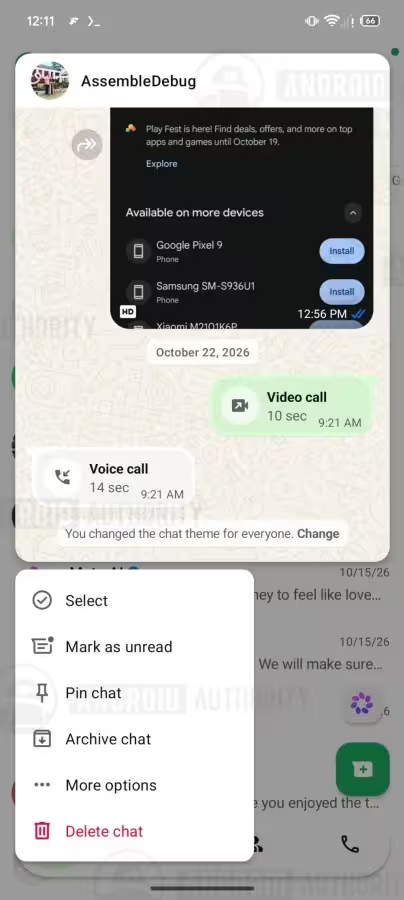
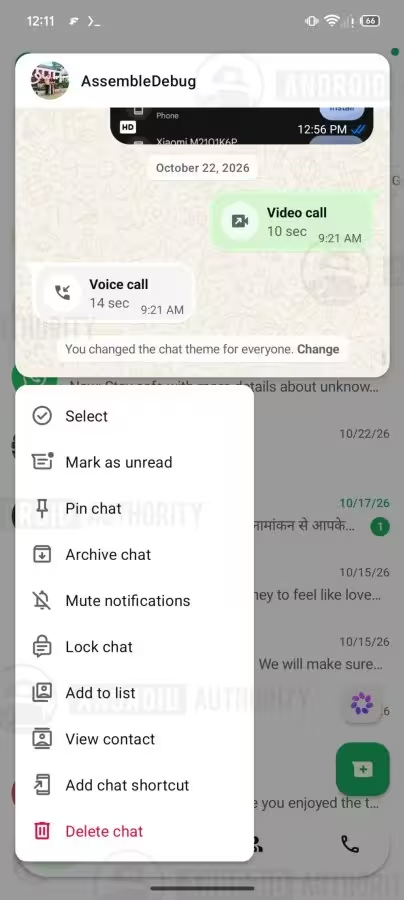
WhatsApp is working on iOS-style chat previews for Android, a change first uncovered in a teardown of WhatsApp for Android beta 2.26.44.12. The code shows long-pressing a conversation will bring up a floating card with the thread's most recent messages and a refreshed context menu beneath it, offering a preview without immediately marking messages as read.
Context and current behavior
The app already lets users turn read receipts off, but when read receipts are enabled there has been no straightforward way on Android to view a message without triggering the blue ticks that indicate a message was seen. System notifications can show message text, but that helps only if the notification is still visible and not swiped away or buried under many incoming messages. On iOS, long-pressing a conversation in the chat list produces a pop-up with the latest messages and does not trigger read receipts; that pop-up does not scroll, so longer messages or many messages cannot be fully previewed. On Android today, long-pressing a chat simply selects it and opens the top bar with pin, archive, mute, and delete options.
 |  |
What the teardown revealed and its limits
The teardown of beta 2.26.44.12 shows code for a floating preview card similar to iOS but with one notable difference: the Android preview appears to allow scrolling within the window to view older messages without sending read receipts for any of them. Peeking at a conversation this way would therefore avoid the blue ticks that signal a read receipt, according to the discovered code. The refreshed context menu is shown underneath the floating card in the same interaction.
The feature is still under development and is not yet available to public beta testers. As is often the case with features uncovered in teardowns, there is no confirmed timeline for a stable release and the presence of code in a beta teardown does not guarantee the feature will ship to users.


“I love exploring gadgets, apps, and trends that redefine how we connect, work, and play in a digital world.”

Discussion
Leave a Comment
Comments
No comments yet. Be the first.