
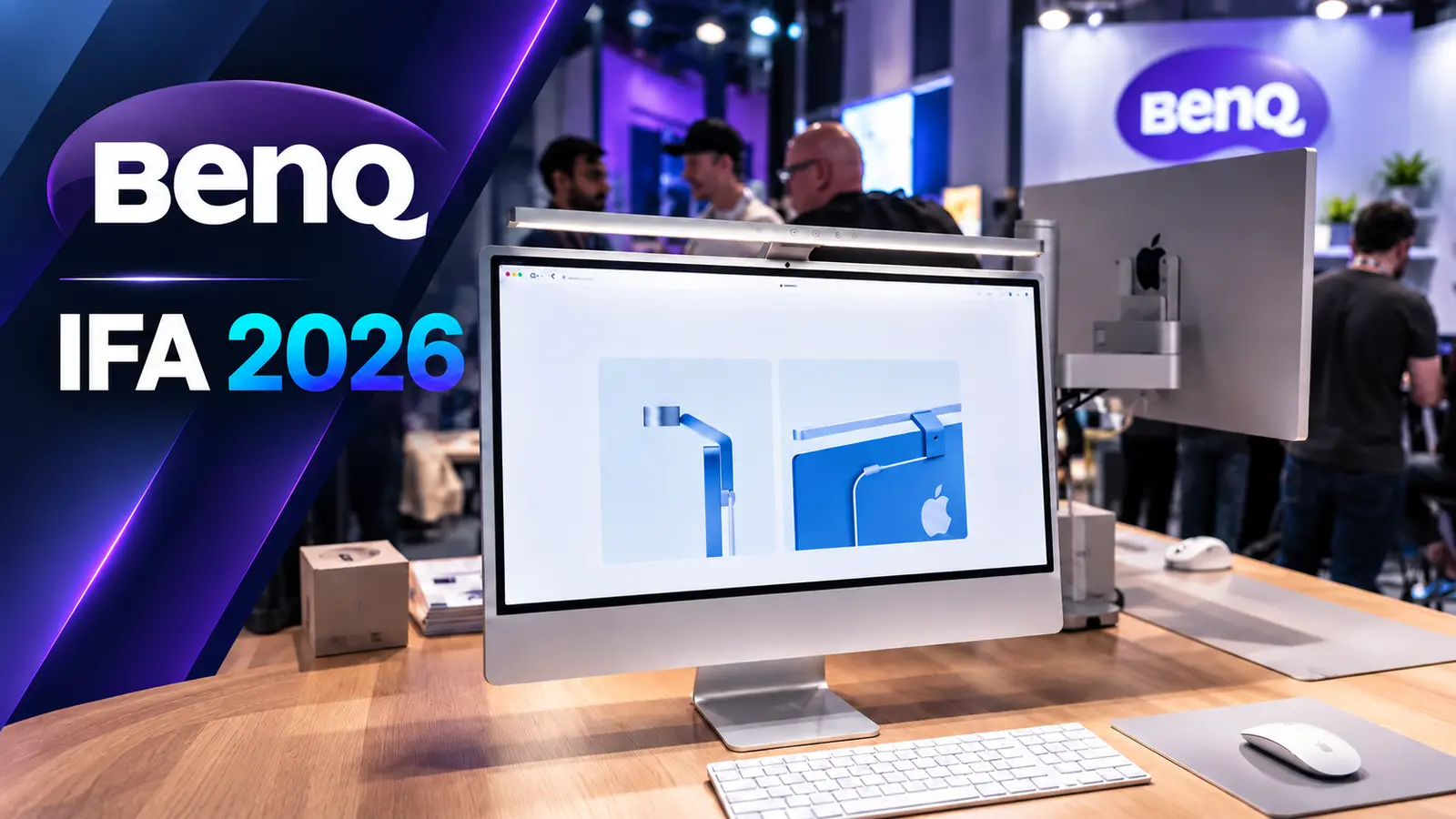
BenQ used IFA 2026 to show a different side of its accessory business. Alongside the company’s familiar display-related products, BenQ introduced evtlab, a new brand created specifically for Apple users, with a focus on ergonomics and tighter integration with Mac hardware.
During our visit to the booth, BenQ representative Kiki, who works on the new evtlab brand, introduced three of its first products: the M-Mouse, Flow Desk Mat and Studio Arm. We were also shown BenQ’s new iScreenBar, a monitor light designed specifically for Apple’s iMac.
The common idea behind all four products is fairly clear: preserve the visual simplicity Apple users expect, while fixing some of the practical limitations BenQ believes still exist around ergonomics, desk setup and lighting.
evtlab is BenQ’s new accessory brand for Apple users
According to Kiki, BenQ created evtlab after identifying what it sees as small but meaningful gaps in the Apple ecosystem, particularly around ergonomics.
Rather than simply making generic accessories that also happen to work with a Mac, evtlab is being positioned as a brand designed around Apple hardware from the beginning.
The first products shown at IFA were all aimed at the desktop workspace.

M-Mouse tries to sit between Apple’s Magic Mouse and Logitech’s MX Master
The evtlab M-Mouse is designed primarily for MacBook users.
BenQ’s pitch is that many Mac users end up choosing between two very different products: Apple’s Magic Mouse, with its familiar gesture-based interaction and minimal design, and Logitech’s MX Master family, which offers stronger ergonomics but is considerably larger.
The M-Mouse is intended to combine some of the strengths of both.
It supports a USB-C wireless dongle for MacBook users and also comes with a USB-A adapter, meaning it can be used with Windows systems as well.
Several shortcuts are preconfigured out of the box. The top button is assigned to screenshots, while a side button provides direct access to Mission Control.
Users who want more control can configure the mouse through BenQ’s Glide software. A browser-based version is also available for environments where users cannot install desktop software, such as managed company computers.
One particularly useful design choice is that custom settings are stored directly on the mouse itself. According to BenQ, this allows those preferences to remain available when moving between computers instead of relying entirely on software installed on each device.

Flow Desk Mat is the simpler part of the ecosystem
The Flow Desk Mat is the least technically complicated of the three evtlab products, but it fits the same workspace strategy.
BenQ designed it as a smooth surface for both Apple’s Magic Mouse and the new M-Mouse.
The emphasis here is less about adding new functionality and more about creating a consistent desktop environment around the rest of the evtlab products.
Studio Arm is designed to look like it belongs with an iMac or Studio Display
The Studio Arm is arguably the most visually Apple-centric of the three accessories.
BenQ says many monitor arms work functionally with Apple displays but do not match the appearance of devices such as the iMac and Studio Display.
The Studio Arm was therefore designed to feel more like a native extension of the Apple workspace.
One detail BenQ emphasized during the booth presentation was keeping the Apple logo visible rather than covering it with the mounting mechanism.
The company also plans support for different Apple display configurations, including iMac and Studio Display setups. For models using a conventional stand rather than a native VESA mounting option, BenQ also provides a VESA adapter solution.
The broader goal is to give users more ergonomic positioning without compromising the visual simplicity of an Apple desk setup.

iScreenBar is built specifically for the iMac
The second major part of BenQ’s presentation was the new iScreenBar, which the company describes as the first monitor light bar designed specifically for Apple’s iMac.
Unlike a generic ScreenBar that clips onto the top of a monitor, the iScreenBar attaches magnetically to the rear of the iMac.
That mounting system is designed around the physical details of Apple’s hardware. The lamp avoids blocking the iMac’s built-in camera and microphone array, while the rear Apple logo also remains visible.
The body itself is made from aluminum, with a glass control surface, helping it visually match the iMac more closely than a conventional monitor light.
Magnetic mounting and cable management keep the setup clean
Installation is intentionally simple.
The light uses a magnetic clip, allowing it to snap into position rather than requiring a conventional clamp. BenQ also includes a magnetic cable-management element intended to keep the power cable routed neatly behind the display.
During the booth demonstration, one of the more thoughtful hardware details was the opening in the mounting area designed to avoid obstructing the iMac’s microphone hardware.
These are small details, but they reinforce the product’s main selling point: it was built around the iMac rather than adapted to it afterward.
ProSync can change lighting automatically depending on the app
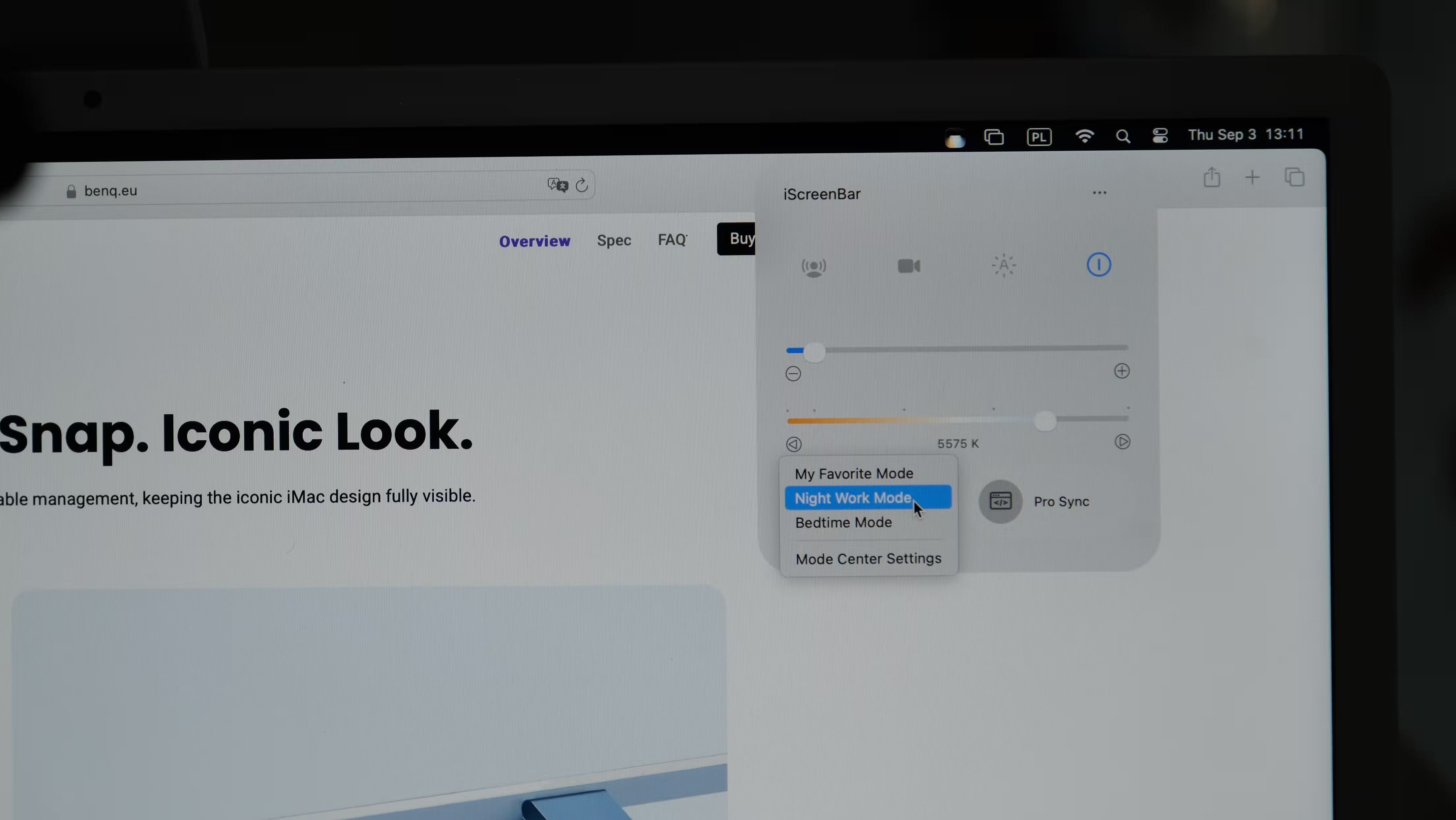
The iScreenBar can be controlled in two ways: directly from its glass touch panel or through a dedicated macOS application.
The app allows users to adjust brightness and color temperature, save preferred lighting modes and switch between presets such as work or evening use.
One of the more interesting functions demonstrated at IFA was ProSync.
With ProSync, users can assign different lighting settings to individual applications. For example, Safari could be configured with brighter, cooler light for productivity, while Apple TV could automatically trigger a warmer, softer setting.
When the active application changes, the ScreenBar can adjust its lighting accordingly.
Independent coverage of the launch confirms that BenQ’s macOS software supports app-specific lighting profiles.

A dedicated video-call mode reduces glare around the camera
The iScreenBar also includes a mode designed specifically for video calls.
When activated, the center section of the light is reduced or switched off while the side lighting is adjusted. The idea is to avoid creating an overly bright hotspot around the camera area and produce more flattering, balanced illumination during video meetings.
BenQ also demonstrated the possibility of linking this behavior to camera activity, provided the user grants the software the required access.
The video mode is part of the product’s official feature set.
ASYM-Light directs illumination onto the desk instead of the screen
BenQ’s ASYM-Light technology remains central to the iScreenBar.
The lighting is designed to illuminate the desk surface while minimizing reflections on the display and limiting direct glare toward the user.
This matters particularly for designers, photographers and other users who depend on consistent screen color and do not want stray light creating visible reflections across the display.
BenQ says the asymmetric optical design can deliver more than 1,000 lux at the center while keeping the light away from the screen itself.
The fixture also uses a shielding angle intended to keep light from shining directly into the user’s eyes.

Sensors add automatic brightness and presence detection
The iScreenBar includes built-in sensing for more automated operation.
An auto-dimming mode can read ambient lighting conditions and adjust the lamp accordingly, while presence detection can turn the light on when the user approaches the desk and switch it off after the user leaves.
Independent launch coverage confirms that presence detection is handled through a 24GHz radar sensor.
This makes the iScreenBar feel less like a conventional desk light and more like another integrated part of the Mac workspace.
BenQ is focusing on the gaps around the Apple ecosystem
What stood out most at BenQ’s IFA 2026 booth was not simply another monitor light or mouse.
The more interesting story is the company’s decision to build a dedicated accessory brand around Apple users.
evtlab’s first products all target areas where BenQ believes Apple’s ecosystem leaves room for improvement: mouse ergonomics, desk organization and monitor positioning. The iScreenBar extends the same philosophy into lighting, with hardware and software designed around the iMac rather than around a generic display.
It is a narrower strategy than launching a broad accessory brand for every type of user, but also a potentially more coherent one. If BenQ can maintain the same level of integration across future evtlab products, the brand could become an interesting option for users who want third-party accessories without giving up the visual consistency of an Apple setup.

“Some times I write about breakthrough startups, digital ecosystems, and how innovation is changing the way we build businesses.”

Discussion
Leave a Comment
Comments (4)
Cute, but feels slightly overhyped. App-specific lighting ok, tho. Storing settings on the mouse is smart, hope the software isnt bloaty
I've swapped desk arms and lights for clients, tiny things like cable mgmt change the whole vibe. If the iScreenBar magnet holds up, neat.
is the magnetic mount really safe over years? iMacs are heavy, and that radar presence thing sounds sketchy, privacy? anyone tested it?
This actually surprised me! BenQ nailed the Apple look AND fixed mouse ergonomics, nice. Still wanna see how comfy the M-Mouse really is...